The Wave Outreach Skill for People Who Run Their Own Outreach

You answer 7 questions. It tells you who could buy from you right now, finds 25 to 75 named people with checked email addresses, writes a priced offer and a one-page sheet for them, and writes one email per person. It sends from your own Gmail. You can approve every email first, or you do not have to. Your rule. When people reply, it files every answer in Gmail, and it can write or send your replies too.

$297, once. Instant access. Nothing recurring.

Nobody answers AI-spam-slop.

Send a wave of 25 to 75 emails people actually answer

A system, a script, and a Claude Code skill for anyone who runs their own outreach. The skill does the finding, the offer, and the first drafts. You approve each step and send from your own Gmail. Best for organic, authentic outreach, not AI-spam-slop at scale.

Five waves, 247 named people, July and August 2026. Twenty-six wrote back.

The system RBD. built its own outreach on.

Megan Starkey, CEO and Principal Consultant of RBD., ran RBD.'s own cold outreach on this system.

The cheapest plan of each, priced 1 September 2026
The Wave Skill$297 once Mailshake$29/mo Smartlead$39/mo Instantly$47/mo lemlist$69/mo
Cost of the first twelve months$297$348$468$564$828
One payment, not a subscription✓————
Costs more for every person you add—✓———
Keeps working after you stop paying✓————
Built for one email per person✓————
Sends templates and automatic follow-ups—✓✓✓✓
Your record stays in your own Gmail✓————

Those tools send thousands of emails a month. Your first ten customers are forty people you can name.

$297 buys a way to find them, write to each one, and keep the record.

Cheapest plan of each, from the vendor's own pricing page, 1 September 2026.

A skill that does the searching.

The Skill
You do not have to find the people, build the offer, or write the first drafts
The Claude Code skill asks you 7 questions, then names 2 to 4 groups of people who could buy from you right now and where to find them. You pick one. It finds the people, checks every email address, writes the offer and the one-page sheet, and drafts every email. The skill never sends. The script does, after you read every draft or in one run if you choose hands off.

What it does, step by step.

  1. 1
    Install it once.
    Save the three skill files into Claude Code, or paste the chat prompt into any chat assistant, such as ChatGPT, Gemini or Copilot. Then create a Google Apps Script project in the Gmail account you send from. The access page walks every screen.
    You, once
  2. 2
    Answer 7 questions.
    Say “run a wave.” First you choose review or hands off. Then it asks what you sell, who has paid you before, what is true of you today, your lowest price, where you already have reach, and who you have already contacted.
    You
  3. 3
    Pick a group.
    It names 2 to 4 groups who could buy from you right now. Each comes with a dated fact that makes them ready to buy, the public list that proves it, the job title that can say yes alone, and how many people that list holds. You pick one. In hands-off mode it takes the top one and tells you why.
    It suggests, you pick
  4. 4
    It finds and checks the people.
    Research agents split the public list and pull each person’s name, title, email, and the web page where that email is published. A second set of agents reopens every page to confirm the address is still there. It removes anyone you have already contacted. You get 25 to 75 named people and a count of who it could not reach.
    It does the work
  5. 5
    It builds the offer.
    It reads what those people published and what their market already pays, then writes 2 or 3 priced offers with the evidence. You pick one. It writes a one-page sheet only when the buyer will need to forward something, and lists every claim about you for you to confirm.
    It drafts, you pick
  6. 6
    It drafts every email.
    One paragraph per person about their own situation, plus the parts that stay the same, written with you once. It hands you the script with your list and text already filled in.
    It drafts, you read
  7. 7
    You send from your Gmail.
    The script runs in Google Apps Script inside your own Google account. At script.google.com you start a new project, paste the script, and click Run. The first run shows Google’s permission screen, and the access page walks you through it. The script labels every email with the wave’s name as it goes. In review mode every email lands in Gmail Drafts with the sheet attached, and you send after reading. In hands-off mode one run stages and sends the wave.
    You click Run
  8. 8
    Replies are filed, and answered if you want.
    Add the replies script once and it checks every 15 minutes. It labels who answered, flags each reply that needs you, labels interested replies as active leads, moves threads with no reply after 14 days to a no-reply label, and puts anyone who asks to stop on a do-not-contact label. With your own Claude API key, it can also write each answer as a draft for you to send, or send the answers it is sure about. A short interview sets it up. It never follows up on silence. The next group runs from step 4.
    It files, you choose who answers

Find targeted prospects. Send them tailored offers, custom one-sheets, and emails written to their own situation. Completely hands off if you want it. The waves run in the background, and you only open your inbox when someone replies. You only see the yeses. Or approve every email before it goes. You decide, per wave.

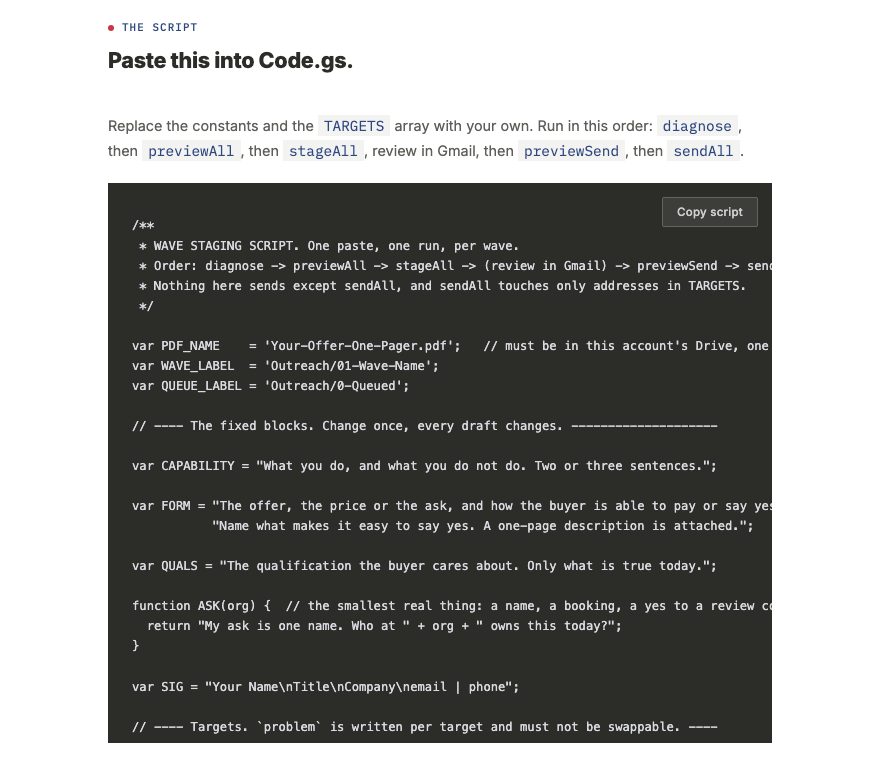
your access page · the script
The complete wave staging script on the access page, with its copy button and the constants you edit at the top

The skeleton is yours before you pay. Copy it and write your best person tonight.

Your options, and what each one needs.

Everything below is in the one purchase. What changes is what you connect. The default is the setup with the fewest moving parts: Claude Code for the research, review mode for sending, labels for replies.

If you wantYou needOtherwise
The skill to find and check the people for youClaude Code on a paid Claude planUse the chat prompt in any chat assistant, such as ChatGPT, Gemini or Copilot. You look up the people and paste them in, and it writes from what you paste.
To read every email before it goesReview mode, the default. Every email waits in Gmail DraftsHands-off mode. One run stages and sends the whole wave.
Replies filed and flagged in GmailNothing extra. The replies script in labels mode does itYou file replies by hand with the same labels.
Claude to draft an answer to each replyYour own Claude API key with prepaid credits, about 2 to 5 cents a reply, billed to you by AnthropicYou write each answer, or paste the thread into your own Claude chat and ask for a draft. Without a key, the script saves one fixed holding line as a draft.
Replies sent for you without reading them firstSend mode, plus the API key and credits. It sends only the kinds of reply you allow, one per thread and 20 a day by defaultDraft mode. Claude writes each answer and you send it.
Interested replies marked Active LeadThe API key. Telling interest apart from a polite no takes ClaudeEvery reply from a person gets Got Reply and Needs You, and you decide.
More than 100 emails a dayGoogle Workspace, which allows 1,500 a day from a scriptA free Gmail account allows 100 a day. A wave of up to 75 fits, or split a bigger one across days.

Your Gmail becomes the record, and the labels do the filing.

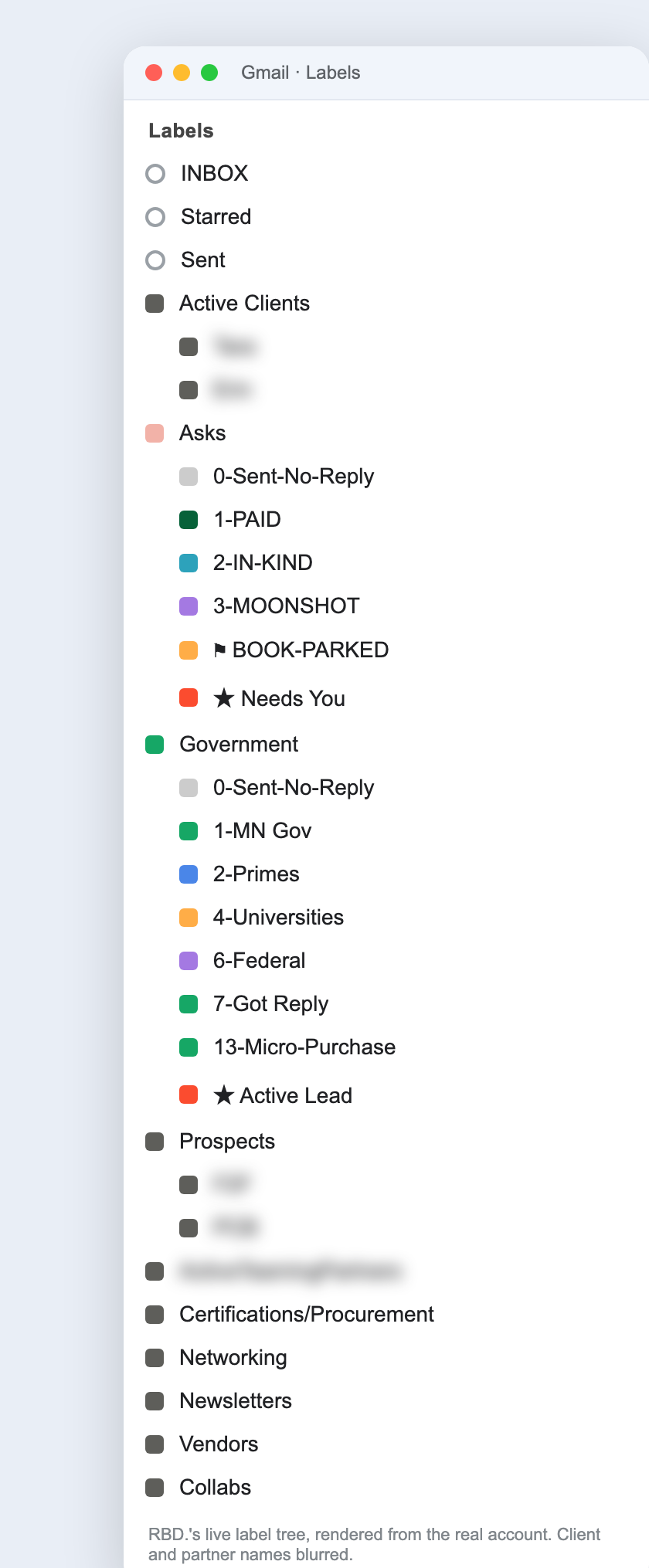
Filing and labeling automation, included and customizable. You track status and next actions in Gmail instead of paying for a CRM. The Gmail script applies the wave labels as it sends. The replies script applies the status labels as people answer. The screenshot is what they grew into.

Filing
automation
You know what failed to send without opening a single draft.
You name both labels at the top of the script. The wave label goes on at staging and stays. The queued label comes off each message as sendAll sends it. You getAnything still queued did not send. You find the failures by opening one label.
Do-not-repeat
archive
You never ask the same person twice.
The replies script moves threads with no reply after 14 days to 0-Sent-No-Reply, which records who was asked, in which wave, and when. You getYou know what someone already saw before you approach them again.
No CRM,
no seat
Status and next actions live in Gmail, not in a CRM you pay for by the seat.
Nothing syncs, exports, or expires. Gmail search and your phone already read it. The full label convention, including the status labels in the screenshot, is written out on your access page, and the replies script applies them for you. You getYour history stays yours, because you never rented it.
RBD.'s live Gmail label sidebar: an Asks tree with 0-Sent-No-Reply, 1-PAID, 2-IN-KIND, 3-MOONSHOT and a Needs You flag, and a Government tree with 0-Sent-No-Reply, numbered campaign waves, 7-Got Reply and an Active Lead flag

Filed by the script, not by hand.

Only sendAll sends, and only to your own list.

stageAll attaches your one-pager to every draft.

FunctionWhat it doesWrites anything?
diagnoseConfirms account and attachment, counts existing draftsNo
previewAllLogs every person and the body it would createNo
stageAllCreates every draft, attaches the file, applies labelsYes
previewSendLists every address that would receive an emailNo
sendAllSends, checking each draft and skipping failuresYes, sends

Who this is for, and who it is not.

A fit if
  • You sell your own services, or have a book, an event, or a network to wake up. You send from Gmail.
  • You would rather write one true paragraph than send a template to a thousand people.
Not a fit if
  • You want volume in one send. A wave is 25 to 75 people, and you run as many waves as you want.
  • You want a bought list pasted in. The skill sources and verifies every address with parallel research agents, and you still read the evidence on every row before it goes anywhere.
  • You want automatic follow-ups. One send per person, and silence is the answer.

$297. Once.

$297
the system · the Apps Script · the Claude Code skill · the sourcer and verifier · the offer builder · the chat prompt · the replies script · the install sheet · yours to keep
Get the Wave Skill ($297)

Those tools rent $348 to $828 a year, every year. This is $297, once.

The skeleton above is yours before you pay. Write one tonight.

What happens after you pay
  1. Your receipt arrives by email.
  2. Your access page opens immediately with everything listed above.
  3. You keep access. The install is one paste.

Why there is no refund

All sales are final, per the Terms of Sale and Refund Policy. This page is the description of record. If what arrives does not match it, email ops@rbdco.ai and it is fixed in one business day.

This skill also ships inside The RBD. Firm OS. Want it fitted to your pipeline live? That is the Build Session, $750.

System requirements.

Required to run a wave.

WhatDetails
Email accountGmail or Google Workspace, the account you send from. Outlook and other email services are not supported.
Google Apps ScriptFree with every Google account. It runs in your browser at script.google.com; nothing installs on your computer.
An AI assistantClaude Code on a paid Claude plan, for the full research with checked addresses. Or any chat assistant, such as ChatGPT, Gemini or Copilot, where you do the looking up and it does the writing.
A computer and a current web browserMac, Windows or Linux. Claude Code runs on all three; the scripts run in any current browser.

Optional, for more.

WhatDetails
Claude API key with prepaid creditsFor Claude-written reply drafts, sending replies for you, and the Active Lead label. About 2 to 5 cents a reply, billed to you by Anthropic. Without it, every reply is still filed and flagged.
Google DriveOnly when a wave carries a one-page sheet. The sheet sits in the same account’s Drive.
Google WorkspaceOnly if you send to more than 100 people a day. A free Gmail account allows 100 a day from a script; Workspace allows 1,500.
Your own listOnly if you skip the research. Paste in people who published their address or gave it to you.

Google’s sending limits are from its Apps Script quota table, checked 15 October 2026.

What this assumes about how you work.

What can go wrong, and what happens.

Each case below has a set response built into the scripts or the steps. The scripts were tested in a live Gmail account on 15 October 2026.

If this happensThe systemYou
Gmail’s daily limit is reached mid-waveSending stops. Every email that did not go keeps the queued labelRun sendAll again the next day, not runWave. Emails already sent are no longer drafts, so nothing sends twice.
An address bouncesThe replies script labels the thread BouncedFix the address or drop it before the next wave.
Someone asks to stopThe thread goes to Do-Not-Contact. The script never writes to that address againLeave that label out of every later wave. The wave skill asks for it as an exclusion list.
A reply asks something your facts do not coverClaude drafts a short note saying you will answer personally, and the thread is flagged Needs You. Nothing sendsYou answer it yourself.
Your API key is wrong or the credits run outEach reply gets the holding draft and Needs You. The setup check names the problemFix the key or add credits. Replies keep their labels the whole time.
Emails land in spam or promotionsNo tool controls where another inbox files your email. These waves are small, plain and written to one person each, sent from your own accountIf replies are slower than you expect, send one to a colleague and ask where it landed.
Your Claude plan hits its usage limit during researchThe research pauses. Each agent saves its rows as it goes, so nothing found is lostResume when the limit resets. Larger plans finish a wave in fewer sittings.
Google’s permission screen fails or keeps coming backGoogle asks once per new permission, and gets confused when two accounts are signed inTick Select all each time. Approve from a window signed in only to the account that sends.
Google or Anthropic changes something and a script stopsThe access page carries the current version of every fileCopy the current version, or email ops@rbdco.ai.

Before you buy.

How does it find people?
It starts from a public list that proves a group is ready to buy, such as permit filings, licensing boards, job postings, association directories, or grant awards. Research agents split that list and pull each person’s name, title, and email from a page where the email is published as a contact. A second set of agents reopens every page to confirm. No address is guessed from a name pattern, and no list is bought.
What if it cannot find an email for someone?
That person stays out of the wave. Anyone it could not confirm is marked “verify before send” for you to check by hand, and organizations with no published contact are named in the report so you do not search for them again.
Will it email someone I have already contacted?
No. In the questionnaire you give it your past contacts and your do-not-contact list, or point it at your Gmail labels. It removes those people before it drafts anything. Every later wave also checks against the waves you already sent.
Can I track who I contacted and who replied?
Yes, in Gmail, and the labels are applied for you. The Gmail script puts a label named for the wave on every email it sends, for example Outreach/01-Permit-Filers, and a second label on anything that did not send, so you find failures by opening one label. The replies script then labels each thread as people answer: Got Reply, Needs You, Active Lead, Sent No Reply after 14 days of silence, Do Not Contact, and Bounced. There is no separate dashboard or CRM.
How do I know when to follow up? Does it send follow-ups?
It never sends a follow-up to someone who did not reply. Each person gets one email. When someone does reply, the replies script labels the thread and flags it Needs You, so your follow-ups are one label in Gmail. The flag clears when you answer. Threads with no reply move to a no-reply label after 14 days, which keeps the record of who was asked and when, so you never ask them twice.
Which AI tools does it work with?
The AI assistant you already use. In Claude Code it does the whole job, including the research agents that find and check every person. In any chat assistant, such as ChatGPT, Gemini or Copilot, you paste the chat prompt into a new conversation and it walks the same steps, with one difference: a chat assistant cannot send out research agents, so you look up the people and paste in what you find, and it writes from that. The sending script is the same either way and runs in your Gmail.
What do I need to run it?
The full list is under System requirements above. In short: a Gmail or Google Workspace account, and either Claude Code on a paid Claude plan or any chat assistant, such as ChatGPT, Gemini or Copilot. A Claude API key is optional, for automatic reply drafts. It does not send from Outlook.
How many waves can I run?
As many as you want. Each group gets its own wave, its own list, its own offer, and its own Gmail label. The one purchase covers every wave after.
Can it answer replies for me?
Yes, if you choose. A short interview sets one of three modes. Labels files every reply and you write every answer. Draft also writes each answer as a Gmail draft for you to read and send. Send also sends the answers it is sure about, for the kinds of reply you allow, such as someone asking for the next step, and drafts everything else. It writes only from the facts you gave it in the interview, waits an hour so you can answer first, sends one automatic reply per thread and 20 a day at most, and never writes to anyone who asked to stop. Draft and send mode use your own Claude API key, billed to you per reply.
How does the Gmail script get set up?
Once, in about two minutes. You sign in to the Google account you send from, go to script.google.com, start a new project, and paste the script. The first time you click Run, Google shows a permission screen and a warning that it has not verified the app, because the app is the project you just made in your own account. The access page walks through each click. After that, each wave is one paste of your list and one click.
Does anything send automatically?
Only if you say so. The Gmail script has a switch. With review on, it stages every email as a Gmail draft and you send after reading. With review off, one run stages and sends the whole wave. The replies script sends nothing unless you set it to send mode. Nothing ever sends to anyone outside your list or to anyone who asked to stop.
Do I need to know how to code?
No. You paste each script once and run each step from a menu. The install sheet covers Google’s permission screens, and the replies interview writes the replies settings for you.
Does it decide who I should be emailing?
It suggests. From your answers it names 2 to 4 groups of people who could buy right now, the public list where each group is found, and the job title that can say yes without asking anyone. You pick which to run and in what order.
Does it write the offer and the one-sheet?
Yes, for each group. It reads what those people published and what they already pay for similar help, then writes 2 or 3 priced offers with the evidence. You pick one. It writes the offer into the email, a one-page sheet when the buyer needs something to forward, and a checklist of every claim about you for you to confirm is true today.
Can I use my own list instead?
Yes. The script sends to whatever is in its list, so you can paste in people you already know or a list you built yourself, one row per person. The skill’s research is there for when you do not have a list. Use addresses people published or gave you; the skill never guesses one, and you should not either.
Will it make up claims about me or invent prices?
No. It writes claims about you only from your own answers, and it gives you a checklist of every one to confirm is true today. Every price comes with the evidence behind it, and a price with no source is marked as your number to set. Draft answers to replies use only the facts you give it in the replies interview.
Can I change what it writes?
Yes. In review mode every email is a normal Gmail draft, so you edit it like any other email before you send. Reply drafts work the same way. Only hands-off mode and send mode skip your read, and only if you choose them.
How much of my time does a wave take?
The skill does the searching, checking and first drafts. Your time goes to the questionnaire, picking a group and an offer, confirming your claims, and, in review mode, reading the drafts before you click send. The first wave takes longest because it includes setup.
Does it work outside the United States?
The research and writing work anywhere buyers publish a way to reach them. The four sending rules on every wave are the US floor. Cold email rules are stricter in places such as the EU, the UK and Canada, so check the rules where your buyers are before you send.
What if something stops working?
The access page always carries the current version of every script, skill and prompt. If something breaks or does not match this page, email ops@rbdco.ai.
What does RBD. host after I buy?
Only the access page. The script, your list, and your mail stay in your own Google account.
What about spam law?
Every wave follows the same four rules: a truthful subject line, a real address, a working opt-out, one send per person.

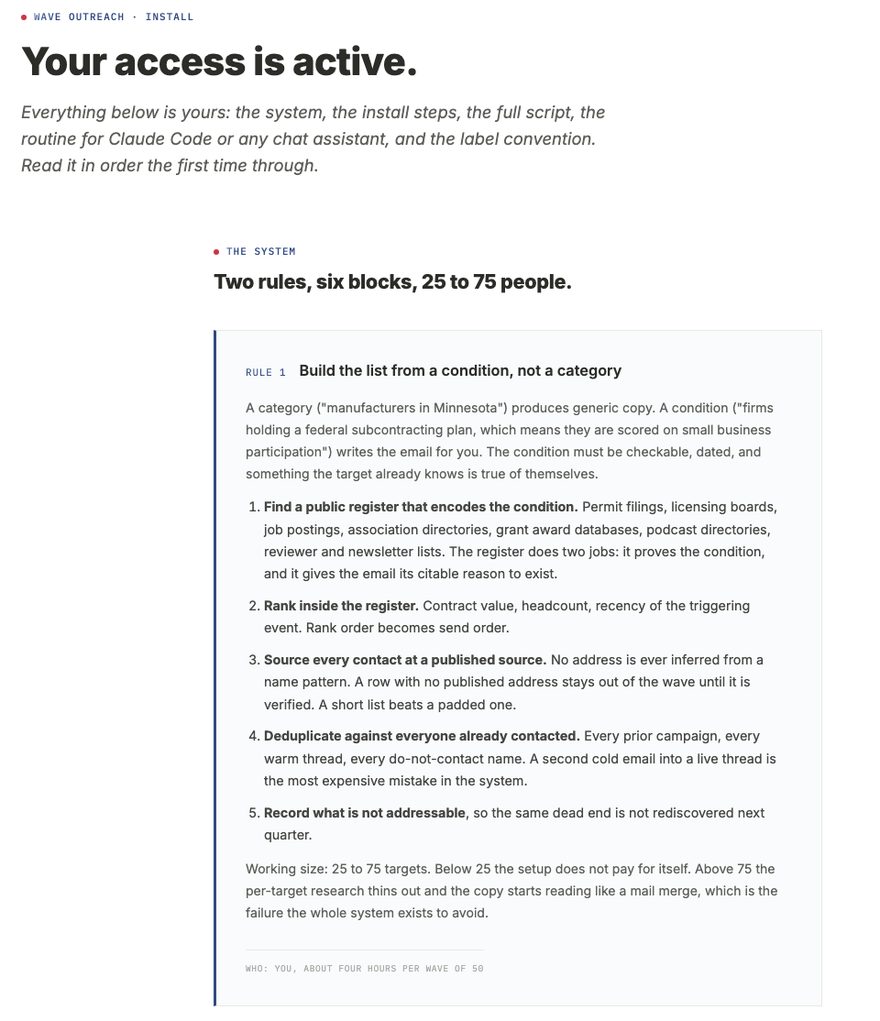
What your access page looks like after checkout.

This is a screenshot of the page that opens when you pay. Yours should look like this. It starts with the system, then the install sheet, the Gmail script, the replies script, the Claude Code skills, and the chat prompts. If yours does not match, email ops@rbdco.ai and it is fixed in one business day.

sample · your access page after checkout
Screenshot of the access page a buyer sees after checkout: the heading Your access is active, then the system section, ahead of the install sheet, the scripts, the Claude Code skills, and the chat prompts

Sample. This is what you see after you pay, not before.

Run your first wave this week.

One purchase. You keep the file and run every wave after on it.

Get the Wave Skill ($297)
Part of the RBD. working systems family
Sales Leader Prompt Library $97 · Firm OS $297